
Rough Metallic Fabric Iray Shaders
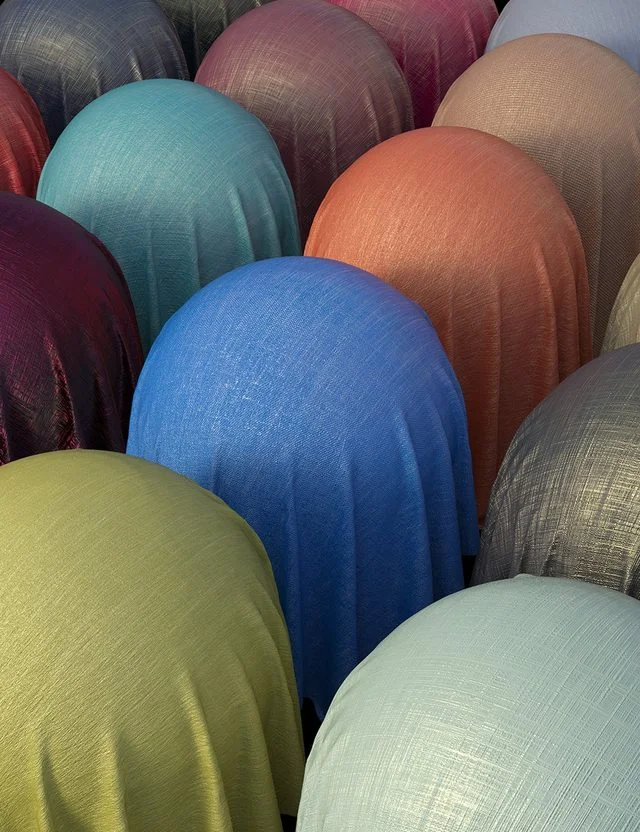
Rough Metallic Fabric Iray Shaders is a large set with many options to give fabric a rough and metallic look.
How does it work? Select the base shader and one of the 25 colors. Metallic flakes are automatically applied and will give your fabric a beautiful metallic finish and shine. The Metallic flakes can be removed to give the fabric a matte finish without the shine. 8 Bump maps are included that can be applied and combined with the base colors and metallic map options. It will give a large variety of options to choose from.
25 metallic flake presets are included, varying from default to high. The metallicity can also be controlled and have 2 presets. This set is ideal for evening clothing, prom dresses, tops, wedding attire, and fantasy clothing.
This is a Merchant Resource and can be used to create your own clothing products for resale, but you are not allowed to create a competing product. Default tiling is at 4. For the promos, a default of 1 has been applied to show the pattern. Experiment with the tiling options to create different effects.
More Info: https://www.daz3d.com/rough-metallic-fabric-iray-shaders
Free Download Links:
Ctrl
Enter
Noticed a misTake
Highlight text and press Ctrl+EnterRelated news:

Secrets of Photorealistic Skin Rendering in DAZ Studio and Poser: Achieving the "Lifelike Skin" Effect with Modern Shaders
Integration of DAZ Studio and Poser with Other 3D Packages: Discussion of Import and Export Processes and Techniques
Advanced Texturing Techniques in DAZ Studio and Poser

Analyzing Trends in Creating 3D Characters for Films and Video Games

Creating Environments in DAZ Studio: How to Use HDRI and 3D Models to Build Atmospheric Scenes

Creating Photorealistic Portraits in DAZ Studio and Poser
Comments (0)