
LIE Makeup Manager
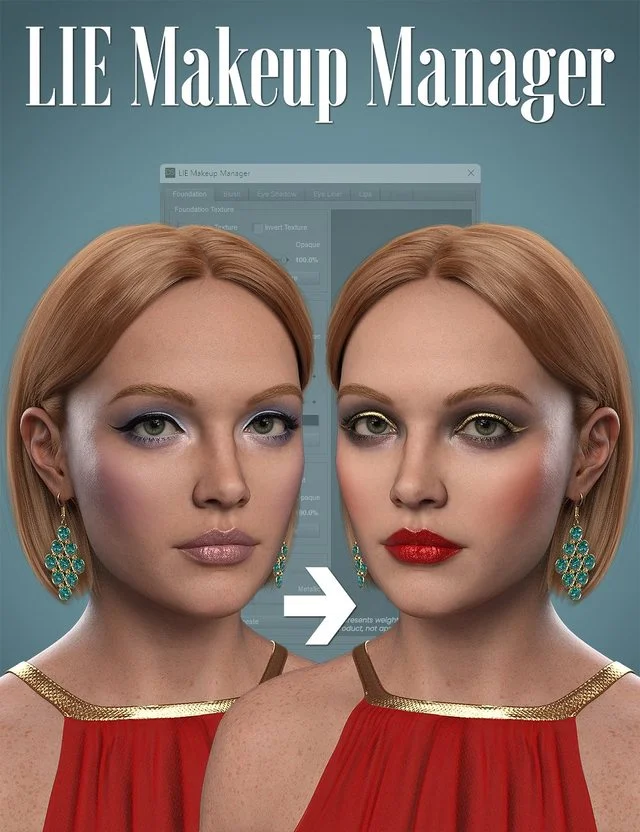
LIE Makeup Manager (LMM) has been designed to add diversity and flexibility to your Genesis 9 makeup collection, natively supporting Daz Original LIE makeup products that have been released alongside new characters such as Victoria 9 HD, Olympia 9 HD, Ally 9 HD, and many others. These makeup products utilize a standard naming system for layers, so products following this standard are compatible with LMM.
Other Genesis 9 makeups that aren't baked into the skin (i.e. have separate layers with transparent backgrounds) can be manually converted to work with LMM and we've provided an LIE template to make this easier for you.
Don't have any Genesis 9 makeup products? No problem, we've included several presets so you can still create beautiful makeup with this product alone - they can also be mixed 'n' matched with supported or converted makeups!
Also included with each preset is an innovative post-load script that auto-detects supported LIE layers, activates required properties, sorts layers, removes duplicates, and supports layer deletion.
With LMM, you can:
Change/add color to makeup layers (foundation, lips, blush, eyeshadow, eyeliner, and extra)
Change opacity/weight of makeup layers
Change/add metallicity to makeup layers
Invert color, weight, and metallicity textures for even more effects
Preview changes in real-time with Iray - no more hanging around for LIE to update or need to refresh manually
https://www.daz3d.com/lie-makeup-manager
Free Download Links:
Ctrl
Enter
Noticed a misTake
Highlight text and press Ctrl+EnterRelated news:

Secrets of Photorealistic Skin Rendering in DAZ Studio and Poser: Achieving the "Lifelike Skin" Effect with Modern Shaders
Advanced Post-Processing Techniques for Renders in DAZ Studio and Poser

V3D FilaToon Converter, Manager and Tools

Analyzing Trends in Creating 3D Characters for Films and Video Games

How to create environments for 3D scenes in DAZ Studio and Poser: general guidelines

Creating Photorealistic Portraits in DAZ Studio and Poser
Comments (0)