
Ancient Sigil Portal Builder
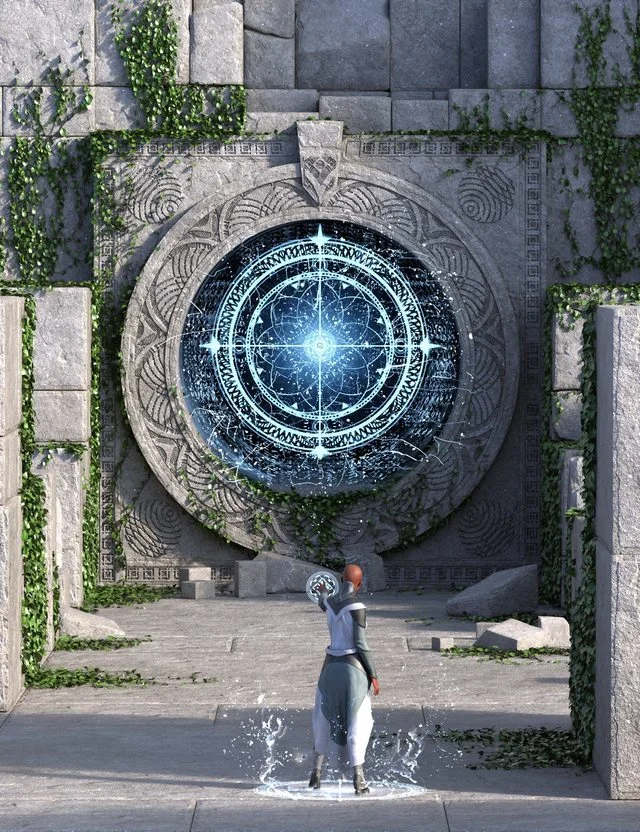
Unveil the mysteries of ancient magic with the Ancient Sigil Portal Builder, a powerful builder designed to craft breathtaking mystical gateways, forgotten temples, and enchanted ruins. Perfect for epic fantasy scenes, cosmic adventures, or arcane storytelling, this set brings your imagination to life with unmatched detail and flexibility.
The set lets you create mesmerizing portals that resonate with ancient power. Choose from several portal options, including a Closed Portal, a Mid-Activation version, and a captivating Portal Tunnel that transports viewers to otherworldly realms. These elements bring instant drama and narrative depth to any scene.
Construct your mystical environment using modular architectural elements. Combine Wall (A-D) subsets with the Tiled Floor elements and a variety of mystical Cubes and Broken Cubes, including ivy-draped versions that seamlessly blend into ancient ruins or overgrown temples. Whether crafting a majestic ceremonial site or a long-lost sanctuary, these pieces allow endless possibilities.
Keep in mind that the displacement options are set to a high level to provide the crisp carved details seen in the promos. Lower the subdivision levels with the included Shader presets, or disable it altogether in case it impacts your render speeds. The included Temple Portal Main and Well House Main are from the promo shots to help you jumpstart your scenes!
Open doors to untold adventures and breathe life into your fantasy worlds with the Ancient Sigil Portal Builder. With its stunning visuals and infinite customization, this set transforms your renders into epic, immersive experiences.
Info: https://www.daz3d.com/ancient-sigil-portal-builder
Free Download Links:
Ctrl
Enter
Noticed a misTake
Highlight text and press Ctrl+EnterRelated news:

Creating Environments in DAZ Studio: How to Use HDRI and 3D Models to Build Atmospheric Scenes

How to create environments for 3D scenes in DAZ Studio and Poser: general guidelines
Creating and Adjusting Lighting for Atmospheric 3D Scenes in DAZ Studio and Poser
Advanced Post-Processing Techniques for Renders in DAZ Studio and Poser
Using Iray and Firefly for Rendering in DAZ Studio and Poser
Working with 3D Scans in DAZ Studio and Poser: A Detailed Guide to Importing and Using Real-World Scans
Comments (0)