
Nikke Anis for Genesis 8 Female
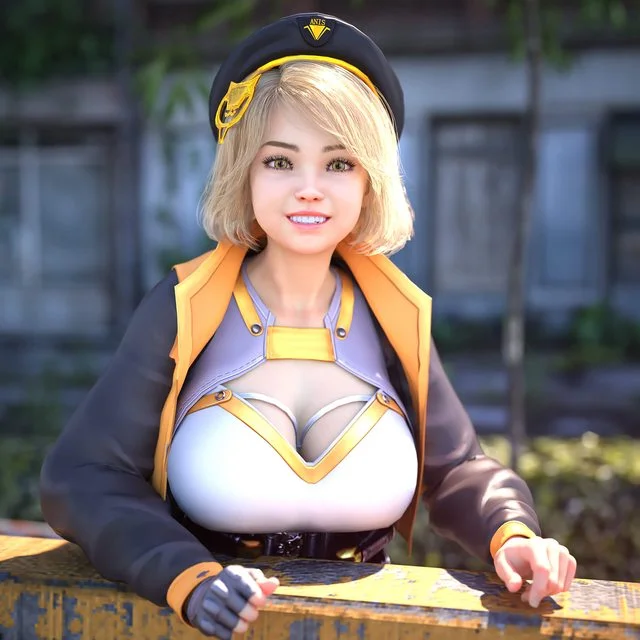
Anis from the game Goddess of Victory: Nikke
Character:
- Anis for Genesis 8 and 8.1 as separated scene subsets.
+ Equipped with outfit
+ Equipped with Hair and Eyebrows.
+ Applied Body, Head and Pressure Morphs
- Anis Body and Head Morphs apply and remove preset (Morphs: DUM Anis Head / DUM Anis Body)
Hair:
- Anis Hair (Short Hair no bones)
(Hat and Pin are props loaded with the hair, you can delete or hide them on scene tab)
- Anis Eyebrows
Materials:
- Apply Skin
(Clean Skin perfect for layered makeup)
Outfit:
@Apply Outfit
@Outfit for 8.1 (The difference is because 8.1 uses different geoshell)
- Belts
- Blouse
- Glove (one Glove, as the character)
- Grenade Strap (It load bullets and smoke grenade as separated props, you need to adjust them for different poses but at least you don't get them deformed if they were part of the outfit)
- Jacket
IMPORTANT! Before you buy, the Jacket as some problems due the layers, to avoid any issues the best thing do it's not to use shoulder bones "Left/Right Collar", you can pose and set them to zero, and adjust for the rest.
The jacket comes with MORPHS for some adjustment after posing, and the lower part is dforce ready.
But again, is not the best part of the outfit and will need adjustment after poses. Just wanted to make sure that you know what you're getting.
- Leg Armor (Same as the Glove, it's only one side)
- Leg Straps
- Shoes (It apply heel pose 50% automatically)
- Shorts
- Socks (Geoshell)
- Socks for 8.1 (Same but for 8.1)
- Top
NOTE: All part of the outfit has fitting morphs for Anis' Body, the results may be different with other morphs.
EXTRAS:
- Pressure Apply and Remove morphs for Socks and Leg Straps
- Hat as Prop
- Head Pin as Prop
Weapon:
- Grenade Launcher (Simple Prop)
Everything comes with high quality custom textures to enhance your renders.
Install directory:
People/Genesis 8 Female/Characters/Dumitas/Nikke/Anis
https://www.renderhub.com/dumitas/nikke-anis-for-genesis-8-female
Free Download Links:
Ctrl
Enter
Noticed a misTake
Highlight text and press Ctrl+EnterRelated news:
Integration of DAZ Studio and Poser with Other 3D Packages: Discussion of Import and Export Processes and Techniques
Nikke Alice for Genesis 8 Female

Secrets of Photorealistic Skin Rendering in DAZ Studio and Poser: Achieving the "Lifelike Skin" Effect with Modern Shaders
Advanced Post-Processing Techniques for Renders in DAZ Studio and Poser
Creating Motion and Emotion Animations for 3D Characters in DAZ Studio and Poser
Working with 3D Scans in DAZ Studio and Poser: A Detailed Guide to Importing and Using Real-World Scans
Comments (0)